Light Lane
One Tap Lane Runner
Unavailable right now
Works on computer, phone and tablet

Light Lane
About & controls TapClickSpace Swap lanes Arrow keysWASD Swap lanes
About Light Lane
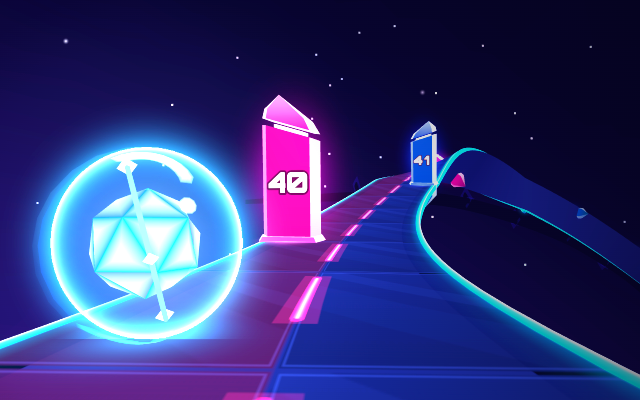
Roll a glowing glass orb down a ribbon of light that bends, dives, corkscrews and loops upside down through deep space. One tap swaps lanes. Every block on the road carries a number, and the number you pass is your score, so the road itself keeps count. Touch one and the run is over.
How to play
Your orb rolls forward on its own. Tap, click or press Space (or any arrow key) to slide it into the other lane. A tap halfway through a swap turns it straight back, so you can dodge late. Each block shuts one lane, so read the road ahead and keep zig-zagging through the gaps. Pass block 57 and your score is 57. The road speeds up as you go, and the gaps between blocks close in, so early runs feel calm and past 200 they get frantic.
Tips
- Swap early rather than late: the orb is clear of its old lane a split second into a swap.
- Blocks mostly alternate sides, but now and then two in a row shut the same lane. Don’t swap twice by reflex.
- Watch the road’s edges, not the orb: when the ribbon rolls over or loops, the lanes stay the same even though the world turns upside down.
- Gems sit in one lane now and then. Grab them when it’s safe, never into a block.
- Once you score 25 and have more than 50 gems, a crash offers a revive for 50 gems, once a run.
What’s in it
An endless Classic run on a road chained from 22 pieces: twists, bends, valleys, ramps, plunges, long spirals, U-turns and a full loop, played in one of eight fixed road orders. Your best score and today’s best get their own gates on the road, so you can see the record coming. Gems unlock new orbs in the menu, each with its own glowing core. Six block styles (Monolith, Orb, Frame, Voxel, Cube and Shards) appear at random or as you choose, and ten road looks unlock as your best score climbs, one every 25 points. Your best, gems, orbs and settings are saved.
Controls
- TapClickSpace
- Swap lanes
- Arrow keysWASD
- Swap lanes
- Esc
- Menu
On a phone or tablet, use the on-screen buttons.
Light Lane FAQ
Can I play Light Lane without downloading it?
Yes. Light Lane runs right in your web browser on Tofubi, so there's nothing to download or install. Just press play.
Is Light Lane free?
Yes, Light Lane is free to play, and you don't need an account to play it.
Can I play Light Lane on my phone?
Yes. Light Lane works on phones and tablets as well as computers.
How do you play Light Lane?
Tap / Click / Space to swap lanes. Arrow keys / WASD to swap lanes. Esc to menu. On a phone or tablet, play with touch.
What kind of game is Light Lane?
Light Lane is a one tap lane runner: an arcade game. If you like it, try Hue Hop, Ewe Turn or Neon Dart.
Who made Light Lane?
Light Lane was made by the Tofubi team.
When did Light Lane come out?
Light Lane came out on Tofubi in November 2026.
Comments